Green Star courses
Improve your Green Star expertise
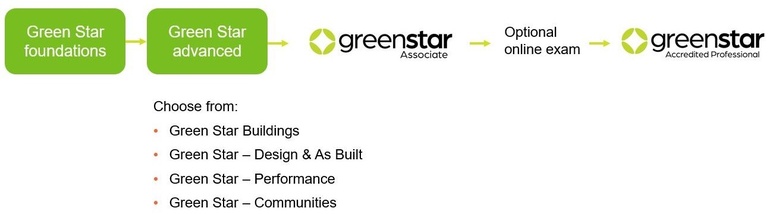
Our Green Star courses are the best way to learn and improve your knowledge of Green Star and our rating tools. Whether new to sustainability or on the pathway to building your capacity, we have a range of courses to suit your needs. Our Green Star courses are the pathway to GSA and GSAP accreditation as part of our Continuing Professional Development (CPD) Program. See below for further information.
Courses overview
Green Star Foundations
Green Star Foundations is the first step to becoming a Green Star Associate (GSA) or Green Star Accredited Professional (GSAP).
Whether new to sustainability or needing greater knowledge to influence stakeholders, this course is the ideal place to begin.
Prerequisites: None
CPD points: 4
Delivery: Online
Find out more about our CPD program >
Green Star Advanced
Green Star Advanced is for those wanting to specialise on a Green Star rating tool and gain accreditation - Green Star Associate (GSA) or Green Star Accredited Professional (GSAP). Green Star Advanced is offered for the following rating tools: Buildings, Communities, Performance and Interiors.
Prerequisites: Green Star Foundations
CPD points: 6
Delivery: Online
Green Star for Contractors
A practical workshop to make your Green Star processes more efficient and effective and gain skill-based knowledge on how to make sure your documentation is compliant.
For contractors, sub-contractors, or anyone in the project team who is working on a Green Star project.
Prerequisites: Green Star Foundations
CPD points: 2
Delivery: Online
In-house option
Do you have teams or wider members of your organisation that need to understand Green Star?
Both our Foundations and Advanced courses can be delivered as an in house course.
For groups greater than 10 attendees, we can organise training at a time and date to suit you and tailor discussions around your organisational needs.
Learn more about what's involved here.